<?xml version="1.0" encoding="utf-8"?><feed xmlns="http://www.w3.org/2005/Atom" ><generator uri="https://jekyllrb.com/" version="3.10.0">Jekyll</generator><link href="https://puma281.github.io/feed.xml" rel="self" type="application/atom+xml" /><link href="https://puma281.github.io/" rel="alternate" type="text/html" /><updated>2025-01-14T15:21:39-08:00</updated><id>https://puma281.github.io/feed.xml</id><title type="html">Uma</title><subtitle>Dual Degree, Chemical Engineering, IIT Bombay</subtitle><author><name>Uma Puttu</name><email>puma281.11@gmail.com</email></author><entry><title type="html">Documentation of CIMS data procedures</title><link href="https://puma281.github.io/posts/2023/01/Documentation%20of%20CIMS%20data%20procedures/" rel="alternate" type="text/html" title="Documentation of CIMS data procedures" /><published>2025-01-09T00:00:00-08:00</published><updated>2025-01-09T00:00:00-08:00</updated><id>https://puma281.github.io/posts/2023/01/code-reduction</id><content type="html" xml:base="https://puma281.github.io/posts/2023/01/Documentation%20of%20CIMS%20data%20procedures/"><![CDATA[<p>The raw data of CIMS can be pretty huge at times leading to 4-5 GB of data. Hence it is important to organize the data neatly and have a code repository to convert the raw h5 files into the .mat files which can be used further.</p>

<p>This <a href="https://wustl.app.box.com/folder/289860503849?s=87c1rrurb7ppev895tfqbde3tlshotg7">folder</a> has the documents showing how to step wisely do the data organization.</p>]]></content><author><name>Uma Puttu</name><email>puma281.11@gmail.com</email></author><category term="CIMS" /><category term="TofWerk" /><summary type="html"><![CDATA[The raw data of CIMS can be pretty huge at times leading to 4-5 GB of data. Hence it is important to organize the data neatly and have a code repository to convert the raw h5 files into the .mat files which can be used further.]]></summary></entry><entry><title type="html">Fragmentation of Isoprene in CIMS?</title><link href="https://puma281.github.io/posts/2023/01/Fragmentation%20of%20Isoprene%20in%20CIMS/" rel="alternate" type="text/html" title="Fragmentation of Isoprene in CIMS?" /><published>2025-01-09T00:00:00-08:00</published><updated>2025-01-09T00:00:00-08:00</updated><id>https://puma281.github.io/posts/2023/01/isoprene-fragment</id><content type="html" xml:base="https://puma281.github.io/posts/2023/01/Fragmentation%20of%20Isoprene%20in%20CIMS/"><![CDATA[<p>Isoprene is a major VOC emitted by plants <a name="_ftnref1" href="#_ftn1">[1]</a> . It plays an important role in atmospheric chemistry, accounting for a significant share of VOC emissions from plants, and it also controls ozone production in the atmosphere.</p>

<p>Isoprene can be detected by the benzene CIMS.But this appears as two ions in the mass spec C5H8 &amp; C11H14 with the later being much higher in amount.</p>

<hr size="1" />

<p><a name="_ftn1" href="#_ftnref1">[1]</a> Sharkey, Thomas D., and Sansun Yeh. “Isoprene emission from plants.” Annual review of plant biology 52.1 (2001): 407-436.</p>]]></content><author><name>Uma Puttu</name><email>puma281.11@gmail.com</email></author><category term="CIMS" /><category term="Benzene" /><category term="Fragmentation" /><summary type="html"><![CDATA[Isoprene is a major VOC emitted by plants [1] . It plays an important role in atmospheric chemistry, accounting for a significant share of VOC emissions from plants, and it also controls ozone production in the atmosphere.]]></summary></entry><entry><title type="html">Generating PPT files in MATLAB</title><link href="https://puma281.github.io/posts/2023/01/ppt-usage-matlab/" rel="alternate" type="text/html" title="Generating PPT files in MATLAB" /><published>2025-01-09T00:00:00-08:00</published><updated>2025-01-09T00:00:00-08:00</updated><id>https://puma281.github.io/posts/2023/01/ppt-usage-matlab</id><content type="html" xml:base="https://puma281.github.io/posts/2023/01/ppt-usage-matlab/"><![CDATA[<p>Dealing with a lot of figures can be quite challenging. You have to analyze multiple figures at once. Saving them as images and opening all the images to compare them can be quite tedious. Also, you have to create a PowerPoint presentation to show them to someone again. It might seem overwhelming and boring after a long and exhausting coding process to generate these figures.</p>

<p>Here comes the reportgenerator package in MATLAB to rescue us from these issues. It generates a report from a given code. But who makes a report in MATLAB, hmm? I use LaTeX sometimes, Word though for smaller reports. But yeah, you heard it true: MATLAB can generate reports, but we will use this technique to create PowerPoint files from the ton of images that are produced in the codes.</p>]]></content><author><name>Uma Puttu</name><email>puma281.11@gmail.com</email></author><category term="MATLAB" /><category term="Power Point" /><summary type="html"><![CDATA[Dealing with a lot of figures can be quite challenging. You have to analyze multiple figures at once. Saving them as images and opening all the images to compare them can be quite tedious. Also, you have to create a PowerPoint presentation to show them to someone again. It might seem overwhelming and boring after a long and exhausting coding process to generate these figures.]]></summary></entry><entry><title type="html">Clicks of Chicago</title><link href="https://puma281.github.io/year-archive/2023/03/blog-post-1/" rel="alternate" type="text/html" title="Clicks of Chicago" /><published>2023-03-31T00:00:00-07:00</published><updated>2023-03-31T00:00:00-07:00</updated><id>https://puma281.github.io/year-archive/2023/03/blog-post-1</id><content type="html" xml:base="https://puma281.github.io/year-archive/2023/03/blog-post-1/"><![CDATA[<h1 id="beautiful-scenary-of-lake-michigan-">Beautiful Scenary of Lake Michigan !</h1>

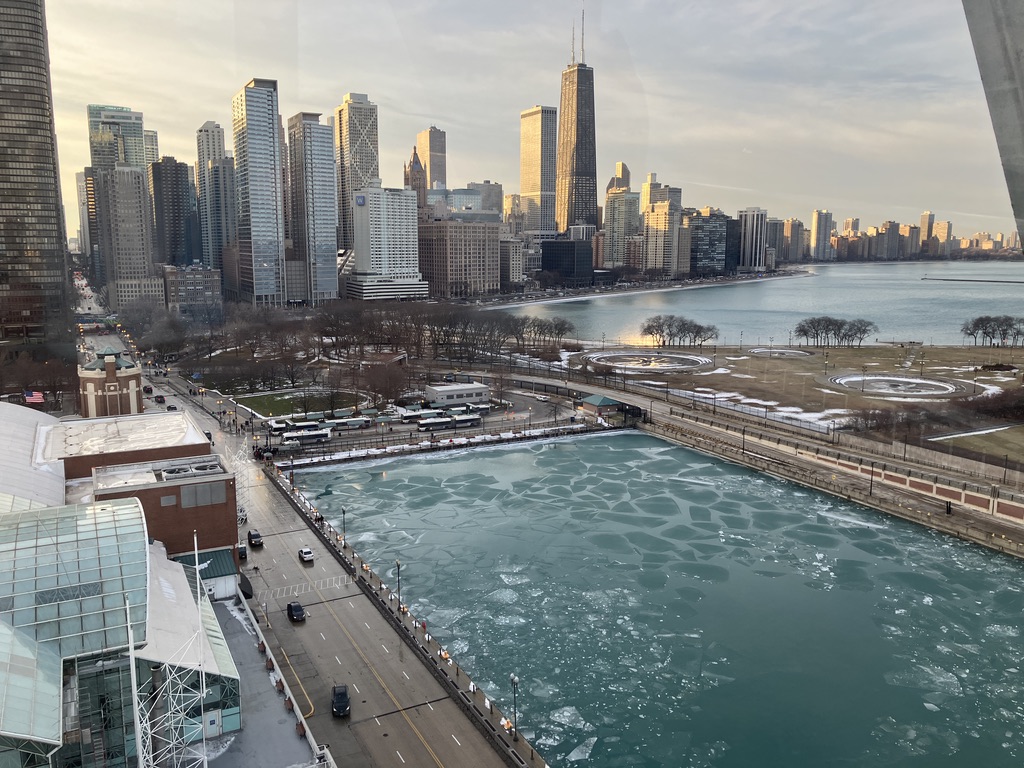
<p>=========
<br /><img src="/images/michi_11.jpeg" />
=========
<br /><img src="/images/michi_12.jpeg" /></p>]]></content><author><name>Uma Puttu</name><email>puma281.11@gmail.com</email></author><category term="chicago" /><category term="christmas" /><category term="winter" /><summary type="html"><![CDATA[Beautiful Scenary of Lake Michigan !]]></summary></entry><entry><title type="html">Distillation Column</title><link href="https://puma281.github.io/posts/2023/03/blog-post-3/" rel="alternate" type="text/html" title="Distillation Column" /><published>2023-03-20T00:00:00-07:00</published><updated>2023-03-20T00:00:00-07:00</updated><id>https://puma281.github.io/posts/2023/03/blog-post-2</id><content type="html" xml:base="https://puma281.github.io/posts/2023/03/blog-post-3/"><![CDATA[<h1 id="distillation-column-is-cool">Distillation Column is cool</h1>
<h2 id="application-link-httpspuma281shinyappsioplat_ant">Application Link: <a href="https://puma281.shinyapps.io/plat_ant">https://puma281.shinyapps.io/plat_ant</a></h2>
<p>======</p>

<h2 id="distillation-background">Distillation Background:</h2>
<p>Distillation is the most frequent unit operation for converting liquid mixtures into valuable and high-purity products.It is usually the most economical method of separating liquids,superior to the extraction,adsorption and crystallization techniques.Solving the Material balance, Equilibrium, Summation, and Heat balance equations step-by-step is the standard method for resolving a common multi-component distillation problem. Shortcut methods are still helpful in the initial design work and as a tool for defining problems for computer simulation, even though computer programs are typically available for the rigorous solution of the MESH equations. This application uses the Fenske-Underwood-Gilliland (FUG) method, a widely used suitable distillation technique.</p>

<h2 id="user-interface-description">User Interface Description</h2>
<p>User interface in the Application for choosing the compounds:
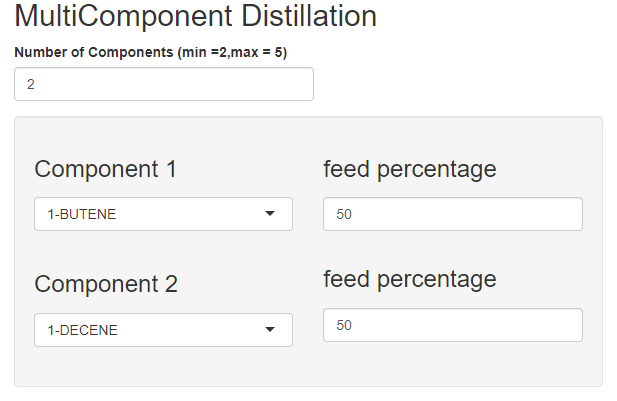
<br /><img src="/images/multi-1.png" /></p>
<h3 id="1-number-of-components-min-2max--5">1. Number of Components (min =2,max = 5):</h3>
<p>In this we need to input the number of components for the distillation column max upto 5 components</p>
<h3 id="2component-1-or-2">2.Component 1 or 2:</h3>
<p>The Component-1 and Component-2 are the two compounds which we have to choose to calculate the volatility and observer their relative volatility for the range of Temperature</p>
<h3 id="3feed-percentage">3.Feed Percentage:</h3>
<p>In this box we need to enter the feed percentage of all the components which sums to 100%
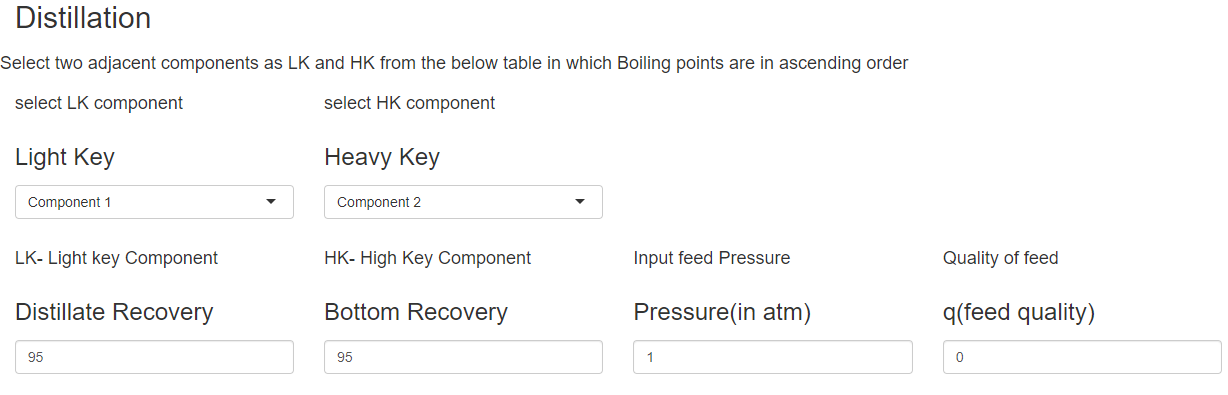
<br /><img src="/images/multi-2.png" /></p>
<h3 id="4heavy-key">4.Heavy Key:</h3>
<p>Choose the component next to the light key which has the immediate highest boiling point which will be recovered in the bottoms from the order in the table (Data Table of the constants and Boiling Points in ascending order)</p>
<h3 id="5light-key">5.Light Key:</h3>
<p>Choose the component which you want to recover in the distillate from the order in the table (Data Table of the constants and Boiling Points in ascending order)</p>

<h3 id="7heavy-key">7.Heavy Key:</h3>
<p>Choose the component next to the light key which has the immediate highest boiling point which will be recovered in the bottoms from the order in the table (Data Table of the constants and Boiling Points in ascending order)</p>

<h3 id="8distillate-recovery">8.Distillate Recovery:</h3>
<p>Enter the purity of the distillate you want to obtain</p>

<h3 id="9bottoms-recovery">9.Bottoms Recovery:</h3>
<p>Enter the purity of the bottoms you want to obtain</p>

<h3 id="10input-feed-pressure-in-atm">10.Input Feed Pressure (in atm):</h3>
<p>The pressure at the input of the feed</p>

<h3 id="11quality-of-feed-q">11.Quality of feed (q):</h3>
<p>The quality of the feed based on its condition supersaturate or saturated</p>

<h3 id="12data-table-of-the-constants-and-boiling-points-in-ascending-order">12.Data Table of the constants and Boiling Points in ascending order:</h3>
<p>This table is the new order of the components which we have to choose for the Light key and Heavy Key they have to together for the separation to achieve</p>]]></content><author><name>Uma Puttu</name><email>puma281.11@gmail.com</email></author><category term="Distillation Column" /><category term="Chemical Engineering" /><summary type="html"><![CDATA[Distillation Column is cool Application Link: https://puma281.shinyapps.io/plat_ant ======]]></summary></entry><entry><title type="html">Relative Volatility</title><link href="https://puma281.github.io/posts/2023/01/blog-post-2/" rel="alternate" type="text/html" title="Relative Volatility" /><published>2023-03-01T00:00:00-08:00</published><updated>2023-03-01T00:00:00-08:00</updated><id>https://puma281.github.io/posts/2023/01/blog-post-3</id><content type="html" xml:base="https://puma281.github.io/posts/2023/01/blog-post-2/"><![CDATA[<h1 id="relative-volatility-calculation-using-vapor-pressure-and-plotting-from-antoine-equation">Relative Volatility Calculation using Vapor Pressure and Plotting from Antoine Equation</h1>
<h2 id="application-link-httpspuma281shinyappsiodat_ant">Application Link: <a href="https://puma281.shinyapps.io/dat_ant/">https://puma281.shinyapps.io/dat_ant/</a></h2>
<p>======</p>

<h2 id="theory">Theory</h2>
<h3 id="relative-volatility">Relative Volatility:</h3>
<p>Relative volatility is a measure comparing the vapor pressures of the components in a liquid mixture of chemicals. This quantity is widely used in designing large industrial distillation processes.In effect, it indicates the ease or difficulty of using distillation to separate the more volatile components from the less volatile components in a mixture. By convention, relative volatility is usually denoted as</p>

<h2 id="user-interface-description">User Interface Description</h2>
<p>User interface in the Application for choosing the compounds:
<br /><img src="/images/multi-1.png" /></p>
<h3 id="1-number-of-components-min-2max--5">1. Number of Components (min =2,max = 5):</h3>
<p>In this we need to input the number of components for the distillation column max upto 5 components</p>
<h3 id="2component-1-or-2">2.Component 1 or 2:</h3>
<p>The Component-1 and Component-2 are the two compounds which we have to choose to calculate the volatility and observer their relative volatility for the range of Temperature</p>
<h3 id="3feed-percentage">3.Feed Percentage:</h3>
<p>In this box we need to enter the feed percentage of all the components which sums to 100%
<br /><img src="/images/multi-2.png" /></p>
<h3 id="4heavy-key">4.Heavy Key:</h3>
<p>Choose the component next to the light key which has the immediate highest boiling point which will be recovered in the bottoms from the order in the table (Data Table of the constants and Boiling Points in ascending order)</p>
<h3 id="5light-key">5.Light Key:</h3>
<p>Choose the component which you want to recover in the distillate from the order in the table (Data Table of the constants and Boiling Points in ascending order)</p>

<h3 id="7heavy-key">7.Heavy Key:</h3>
<p>Choose the component next to the light key which has the immediate highest boiling point which will be recovered in the bottoms from the order in the table (Data Table of the constants and Boiling Points in ascending order)</p>

<h3 id="8distillate-recovery">8.Distillate Recovery:</h3>
<p>Enter the purity of the distillate you want to obtain</p>

<h3 id="9bottoms-recovery">9.Bottoms Recovery:</h3>
<p>Enter the purity of the bottoms you want to obtain</p>

<h3 id="10input-feed-pressure-in-atm">10.Input Feed Pressure (in atm):</h3>
<p>The pressure at the input of the feed</p>

<h3 id="11quality-of-feed-q">11.Quality of feed (q):</h3>
<p>The quality of the feed based on its condition supersaturate or saturated</p>

<h3 id="12data-table-of-the-constants-and-boiling-points-in-ascending-order">12.Data Table of the constants and Boiling Points in ascending order:</h3>
<p>This table is the new order of the components which we have to choose for the Light key and Heavy Key they have to together for the separation to achieve</p>]]></content><author><name>Uma Puttu</name><email>puma281.11@gmail.com</email></author><category term="Distillation Column" /><category term="Chemical Engineering" /><summary type="html"><![CDATA[Relative Volatility Calculation using Vapor Pressure and Plotting from Antoine Equation Application Link: https://puma281.shinyapps.io/dat_ant/ ======]]></summary></entry></feed>